Testkube Open Source
The Testkube Runner is 100% Open Source and can be deployed in standalone mode without being connected to the commercial Control Plane.
You can interact with the Standalone Runner through the Testkube CLI or directly via the Runner API.
- Check out Getting Started on how to quickly set up your first Test Workflows.
- Read more about Test Workflows to learn how to run any type of test with Testkube.
- Head over to the Examples & Guides for sample Test Workflows with popular testing tools.
- View an execution in the dashboard Viewing Open Source Execution Results in the Cloud.
- Check out the Getting Started with Testkube Open Source blogpost to further see how you can use the Standalone Runner with GitHub Actions
- Go through the CLI Reference to see available CLI commands.
- Head over to the Testkube Slack to ask questions and get answers.
See the Feature Comparison to understand the differences in functionality between using the Testkube Runner in Standalone and Connected modes.
Open Source Functionality Overview
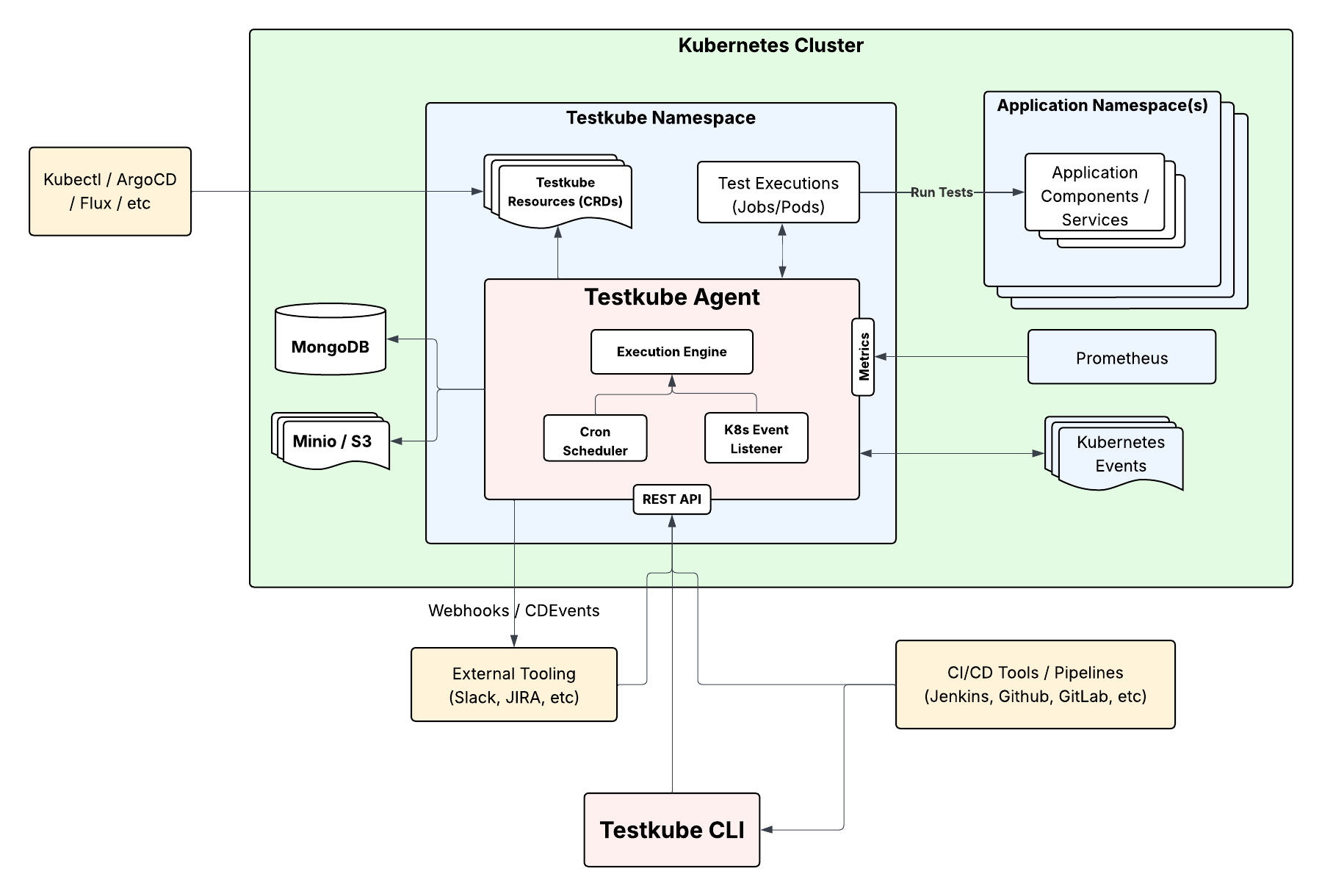
As described in the Standalone Runner Overview, in standalone mode the runner
- Manages all Testkube Resources as CRDs in the cluster/namespace where it is deployed.
- Schedules and executes your Test Workflows and collects execution logs and artifacts into configured PostgreSQL, and S3-compatible storage.
- Listens to Kubernetes Events for Event Triggers.
- Emits Webhooks and CDEvents as configured.
When connected to a Control Plane (v2.7+), these responsibilities are distributed across specialized Runner capabilities: Runner, Listener, GitOps, and Webhook. Resources are stored in the Control Plane rather than as CRDs - Read More.
Migrating from OSS to Commercial
Migrating from a Standalone Runner deployment to utilizing the Testkube Control Plane is described at Connecting to the Testkube Control Plane.
Open Source Licensing
The source-code for the runner is available in the Testkube GitHub repo and is dual-licensed under the MIT license and the Testkube Community License (TCL). Read more in our Open Source Licensing FAQ.