Provisioning Test Environments
A Test Workflow can do more than run tests. It can also install the application under test into a temporary namespace, hand that environment to other Workflows and remove it when they are done. Every execution then tests a fresh copy of the application, and parallel executions do not share state.
This section is about environments that a Workflow provisions itself. If your environments are provisioned outside Testkube, for example by a CI/CD pipeline for every pull request, see Ephemeral Environments for how to run Workflows in them.
The examples in this section provision an environment in three ways:
- Helm - installs a Helm chart into a temporary namespace.
- ArgoCD - creates an ArgoCD Application that deploys into a temporary namespace.
- vCluster - creates a virtual cluster in a temporary namespace and installs a Helm chart into it.
All of them follow the pattern described below.
Namespace or Virtual Cluster
Two decisions shape an environment: where it lives, and how the application gets into it.
A temporary namespace is the fastest and cheapest place for an environment, and enough for an application that only creates namespaced resources. A virtual cluster in a temporary namespace takes longer to create, but gives every environment its own API server. Use one when the application installs CustomResourceDefinitions or other cluster-scoped resources, deploys into several namespaces, or needs another Kubernetes version than the cluster of the Runner.
In both cases the application is installed with the tool you already deploy it with. The Helm and ArgoCD examples install into a namespace, and the vCluster example runs the Helm installation against the virtual cluster.
This Workflows functionality is not available when running the Testkube Runner in Standalone Mode - Read More
The Pattern
Three Workflows do the work, and a fourth one orchestrates them with execute:
- A provisioning Workflow takes the name of a namespace as a configuration parameter, deploys the application into it and waits until the application is ready. It publishes the URL of the application as an output value.
- One or more test Workflows take that URL as a configuration parameter and run against it.
- A teardown Workflow takes the name of the namespace and removes the environment.
- A composite Workflow runs the three in sequence.
apiVersion: testworkflows.testkube.io/v1
kind: TestWorkflow
metadata:
  name: env-helm-suite
spec:
  steps:
    - name: Provision environment
      execute:
        workflows:
          - name: env-helm-provision
            as: env
            config:
              namespace: "env-{{ execution.id }}"
    - name: Run tests
      execute:
        workflows:
          - name: env-smoke-test
            config:
              url: '{{ execution("env").outputs.url }}'
    - name: Tear down environment
      condition: always
      execute:
        workflows:
          - name: env-helm-teardown
            config:
              namespace: "env-{{ execution.id }}"
env-{{ execution.id }}gives every execution of the composite Workflow its own namespace. The execution ID is unique and a valid part of a namespace name.as: envnames the provisioning execution, so that the next step can read the URL it published withexecution("env").outputs.url. See Sharing Data Between Executions.condition: alwaysruns the teardown when the provisioning or a test fails. The composite Workflow still fails in that case.- The
Run testsstep can list any number of Workflows, which then run in parallel against the same environment.
The test Workflow
The test Workflow knows nothing about how the environment was provisioned. It only needs the URL of the application, which makes it reusable against any environment, temporary or not. The examples use this one:
apiVersion: testworkflows.testkube.io/v1
kind: TestWorkflow
metadata:
  name: env-smoke-test
spec:
  config:
    url:
      type: string
  steps:
    - name: Call the application
      run:
        image: curlimages/curl:8.11.1
        shell: |
          curl -sS --fail-with-body "{{ config.url }}/healthz"
          curl -sS --fail-with-body "{{ config.url }}/version"
Where the Tests Run
The test Workflows run in the namespace of the Runner and reach the application through its in-cluster DNS name,
<service>.<namespace>.svc.cluster.local. They do not run inside the temporary namespace.
A Runner only schedules executions in the namespaces it was configured for when it was installed
(Execution Namespace). A Workflow that sets job.namespace
to a namespace created during the execution is aborted with namespace <name> not supported.
To run tests inside an environment instead, the Runner has to know its namespace beforehand, or the environment needs a Runner of its own. Ephemeral Environments describes both setups.
An application in a virtual cluster is reachable in the same way, through the copy of its Service that vCluster creates in the temporary namespace. See Reaching the application.
If a NetworkPolicy in the temporary namespace restricts incoming traffic, allow traffic from the namespace of the Runner.
Permissions
The default ServiceAccount of a Workflow execution cannot create namespaces or deploy applications. The provisioning
and teardown Workflows therefore run with a dedicated ServiceAccount, which they select with
pod.serviceAccountName. The test Workflows keep the default one.
Each example lists the permissions that ServiceAccount needs. Creating it requires access to the cluster of the Runner and is done once, not by a Workflow.
Environment Metrics
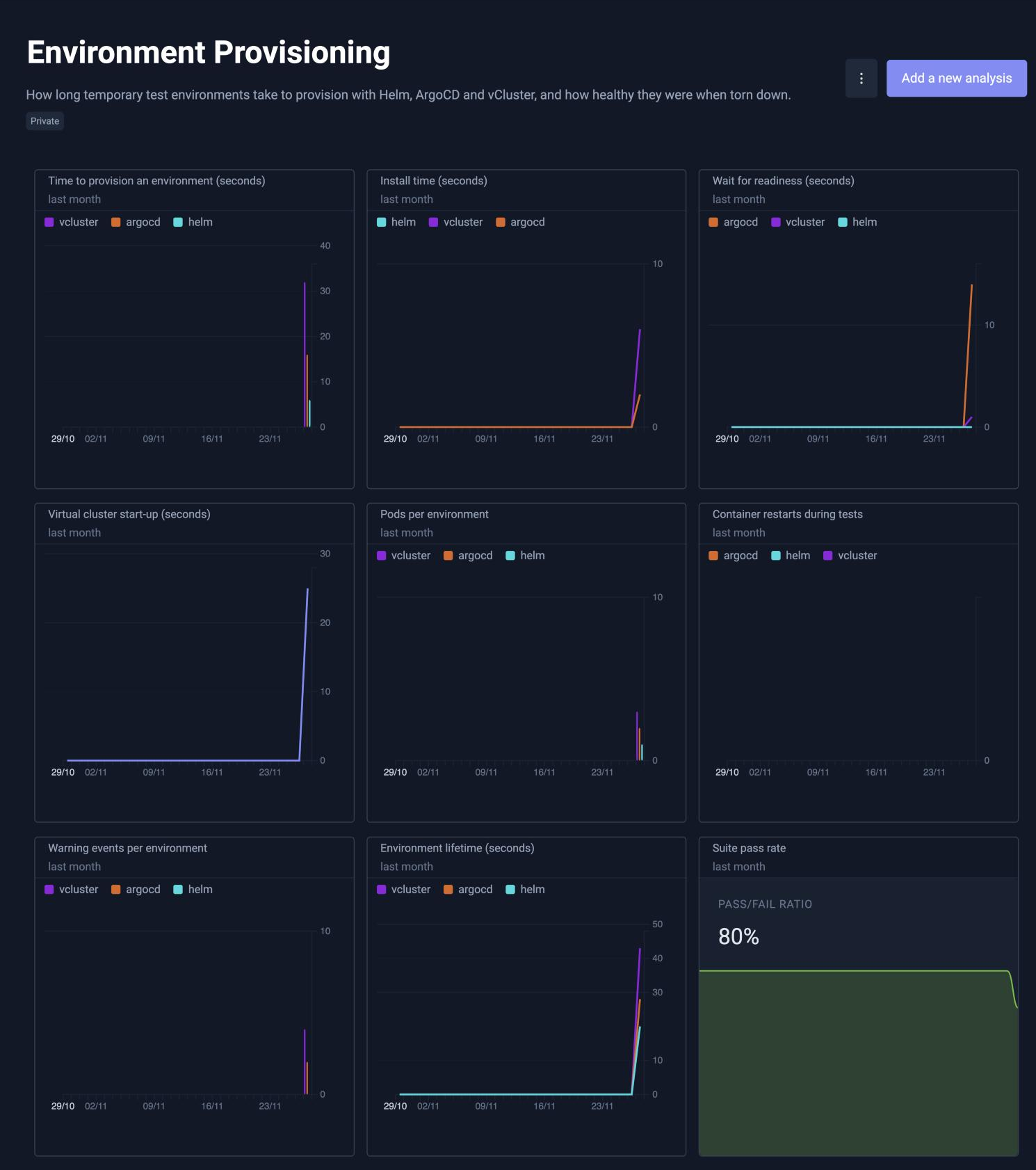
The provisioning and teardown Workflows of the examples also measure the environment. Each writes a file in Influx Line Protocol and uploads it as an artifact, which makes the values available as custom metrics in Insights.
| Metric | Written by | Meaning |
|---|---|---|
environment_provisioning_total_seconds | Provisioning | Time from the start of the provisioning until the application is ready |
environment_provisioning_install_seconds | Provisioning | Time for the Helm installation, or until ArgoCD reports Synced |
environment_provisioning_ready_wait_seconds | Provisioning | Time from the end of the installation until every Pod is available |
environment_provisioning_cluster_seconds | Provisioning | Time to create the virtual cluster (vCluster only) |
environment_provisioning_pods | Provisioning | Number of Pods in the temporary namespace |
environment_provisioning_resources | Provisioning | Number of resources the Application manages (ArgoCD only) |
environment_health_container_restarts | Teardown | Container restarts in the environment, counted before it is removed |
environment_health_warning_events | Teardown | Kubernetes Warning events in the namespace, counted before it is removed |
environment_health_lifetime_seconds | Teardown | Age of the temporary namespace when it is removed |
The two health metrics show how the application behaved while it was tested. A restart or a Warning event, such as
a failed probe or an out-of-memory kill, points at a problem even when every test passed.
Every record carries a provisioner tag (helm, argocd or vcluster) and an app tag, so a report in Insights
can segment a metric by them, for example to compare how long the three ways of provisioning take. The name of the
namespace is not a tag on purpose: it is unique for every execution and would create a new series each time.
The board below charts these metrics for the three examples, each report segmented by the provisioner tag. See
Test Insights for how to build a board.
Cleaning Up after Aborted Executions
condition: always covers failures and timeouts. It does not cover an abort: when a composite Workflow is aborted or
canceled, its remaining steps do not run, and the environment stays behind.
To remove these orphaned environments, the provisioning Workflows label everything they create with
testkube.io/ephemeral-environment: "true". A cleanup Workflow, scheduled to run every
hour, deletes the labeled environments that are older than a configurable age. Each example includes its cleanup
Workflow.
The cleanup Workflow goes by age alone. Set maxAgeSeconds higher than the longest time your tests need, or it removes
an environment that is still in use.