Backstage Integration
Testkube provides official Backstage plugins that bring test execution visibility directly into your developer portal. The integration consists of two plugins:
- UI plugin (
@testkube/backstage-plugin) — adds a Testkube dashboard page and entity-level test summary tabs to your Backstage frontend. - Backend plugin (
@testkube/backstage-plugin-backend) — exposes atestkubebackend service that proxies requests to the Testkube API and provides metadata endpoints used by the UI plugin.
The source code and a working example app are available at github.com/kubeshop/testkube-backstage-plugin.
Features
- Testkube Dashboard — a global page with an overview of the latest test workflow executions, including success/failure metrics, execution times, statuses, and workflow names.
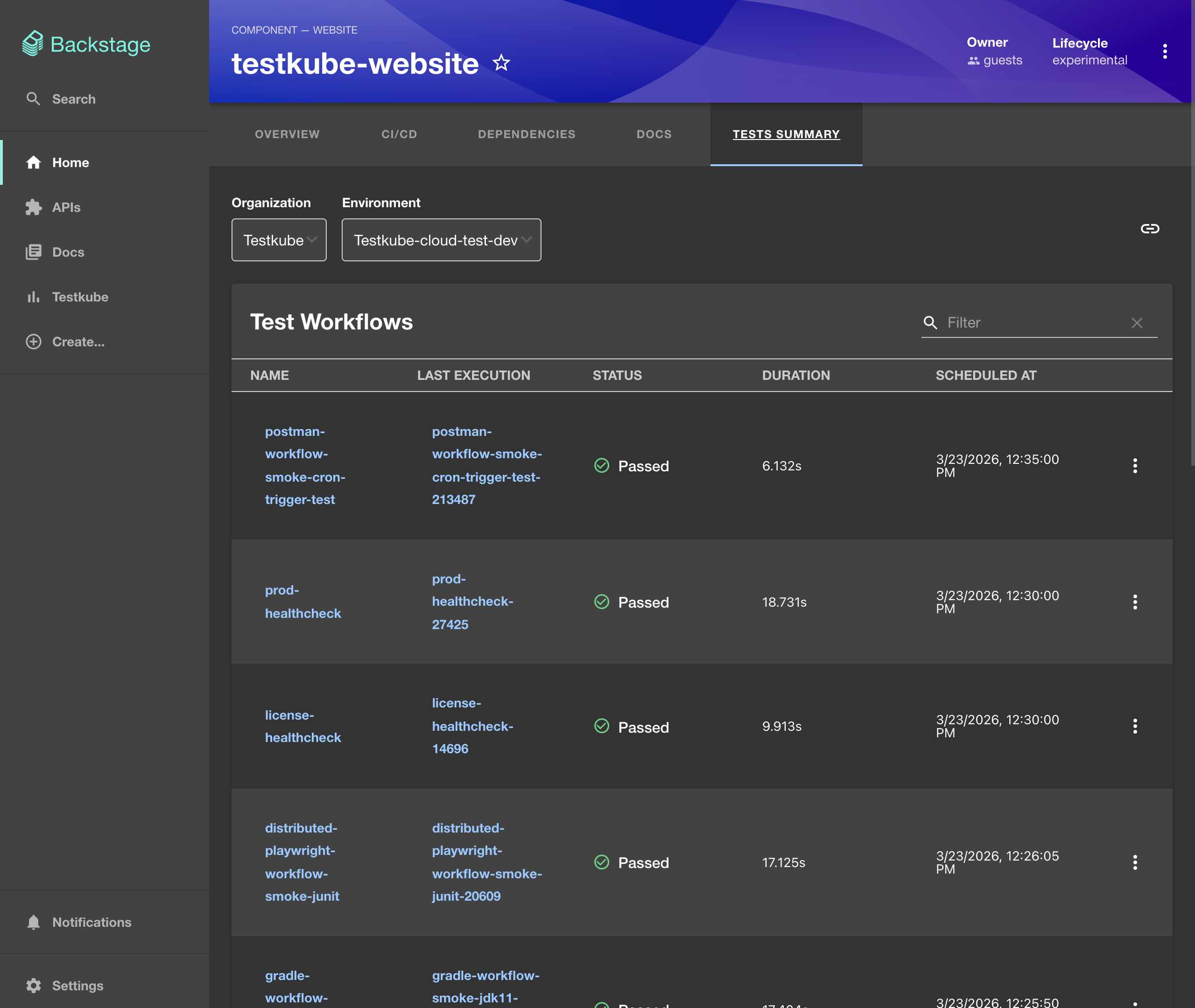
- Testkube Entity Page — an entity-level tab showing test workflows related to a specific catalog entity (filtered by annotation). It includes:
- Metrics panels (success/failure rate, failed executions, total executions).
- Test workflow list with last execution info (duration, date, status).
- View workflow definitions in YAML.
- View execution logs and execution history.
- Trigger test workflow runs directly from Backstage.
Installation
Install both plugins in your Backstage project:
# UI plugin
yarn workspace packages/app add @testkube/backstage-plugin

# Backend plugin
yarn workspace packages/backend add @testkube/backstage-plugin-backend
Backend Setup
Register the backend plugin in packages/backend/src/index.ts:
import { createBackend } from "@backstage/backend-defaults";

const backend = createBackend();

// ... other plugins
backend.add(import("@testkube/backstage-plugin-backend"));

backend.start();
Configuration
The plugin reads its configuration from the testkube section of your app-config.yaml.
- Testkube Enterprise
- Standalone Runner (OSS)
When using Testkube Enterprise, configure multiple organizations with API tokens:
testkube:
  # Base URL of the Testkube API
  apiUrl: "https://api.testkube.io"

  # Enable enterprise mode
  enterprise: true

  # Base URL of the Testkube UI (used for redirect URLs)
  uiUrl: "https://app.testkube.io"

  # Organizations this Backstage instance can access
  organizations:
    - id: tkcorg_XXXXXXXXX
      apiKey: ${TESTKUBE_ORG_API_TOKEN}
Use an API token with read-only access. Avoid embedding tokens with write permissions directly in configuration files — use environment variables instead.
For enterprise mode to work, enterprise must be set to true, uiUrl must
be provided, and at least one organization with an id and apiKey must be
configured.
For a local or self-hosted Testkube Standalone Runner:
testkube:
  apiUrl: "http://localhost:8088"
This should point to the HTTP endpoint of your Testkube API server. If you are using port forwarding:
kubectl port-forward svc/testkube-api-server -n testkube 8088:8088
Adding the Testkube Dashboard Page
Edit packages/app/src/App.tsx to add the Testkube dashboard route:
import { TestkubeDashboardPage } from "@testkube/backstage-plugin";

const routes = (
  <FlatRoutes>
    {/* ... other routes */}
    <Route path="/testkube" element={<TestkubeDashboardPage />} />
  </FlatRoutes>
);
The dashboard will be available at /testkube in your Backstage app.
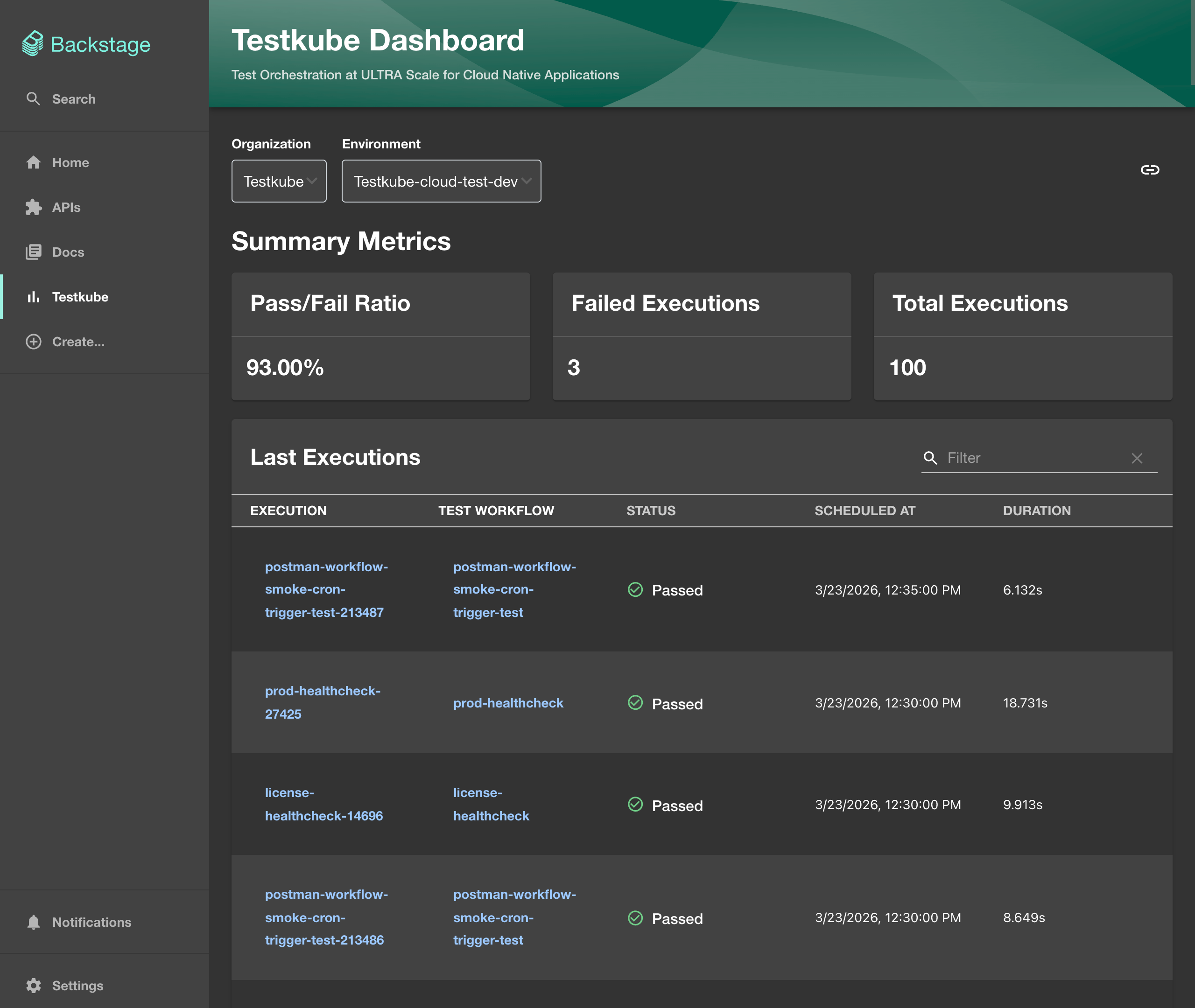
To add it to the sidebar, edit packages/app/src/components/Root/Root.tsx:
import BarChartIcon from "@material-ui/icons/BarChart";

export const Root = ({ children }: PropsWithChildren<{}>) => (
  <SidebarPage>
    <Sidebar>
      <SidebarGroup label="Menu" icon={<MenuIcon />}>
        {/* ... other items */}
        <SidebarItem icon={BarChartIcon} to="testkube" text="Testkube" />
      </SidebarGroup>
    </Sidebar>
    {children}
  </SidebarPage>
);
You can conditionally show the sidebar item using Backstage feature flags by wrapping it with FeatureFlagged:
<FeatureFlagged with="testkube">
  <SidebarItem icon={BarChartIcon} to="testkube" text="Testkube" />
</FeatureFlagged>
Adding the Entity Page Tab
To show test workflows related to a specific catalog entity, edit packages/app/src/components/catalog/EntityPage.tsx:
import {
  TestkubeEntityPage,
  isTestkubeAvailable,
} from "@testkube/backstage-plugin";

const testkubeSummaryPage = (
  <Grid container spacing={3} alignItems="stretch">
    <Grid item xs={12}>
      <TestkubeEntityPage />
    </Grid>
  </Grid>
);

const websiteEntityPage = (
  <EntityLayout>
    {/* ... other tabs */}
    <EntityLayout.Route
      path="/tests-summary"
      title="Tests Summary"
      if={isTestkubeAvailable}
    >
      {testkubeSummaryPage}
    </EntityLayout.Route>
  </EntityLayout>
);
The Tests Summary tab will only appear for entities that have the testkube.io/labels annotation.
Annotating Catalog Entities
Add the testkube.io/labels annotation to any catalog entity to link it with Testkube test workflows. The annotation value should match the labels applied to your test workflows:
apiVersion: backstage.io/v1alpha1
kind: Component
metadata:
  name: testkube-website
  annotations:
    testkube.io/labels: app=testkube-website
spec:
  type: website
  lifecycle: experimental
  owner: guests
This entity will display only test workflows that have the label app=testkube-website.
Backend API Endpoints
The backend plugin registers an HTTP router for the testkube service with the following endpoints:
| Endpoint | Description |
|---|---|
GET /config | Returns Testkube configuration summary (enterprise enabled, org count) |
GET /organizations | Lists organizations the UI can select from |
GET /organizations/:index/environments | Lists environments for a given organization |
GET /redirect | Returns a redirect URL into the Testkube UI |
ALL /* | Proxies all other requests to the configured Testkube API |
All routes are protected using Backstage's httpAuth service.