Execution Tags
Execution tags let you label, filter, and organize your test executions. Tags are key-value pairs that can be set when an execution is triggered, or added and modified after an execution has completed, making them useful both for upfront categorization and for post-hoc analysis.
Adding Tags When Triggering an Execution
There are multiple ways to add tags when triggering a workflow execution.
In the Workflow Definition
You can add tags to a workflow execution by setting the execution.tags field in the workflow definition.
kind: TestWorkflow
apiVersion: testworkflows.testkube.io/v1
metadata:
  name: execution-tags-sample
  labels:
    docs: example
spec:
  execution:
    tags:
      service: "{{config.serviceUnderTest}}"
      url: "{{config.targetUrl}}"
From the CLI
The Testkube CLI allows you to specify tags when triggering a workflow execution using the --tag flag:
testkube run testworkflow execution-tags-example --tag service=testkube-app
In a TestTrigger
Testkube TestTriggers allow you to specify tags when triggering a TestWorkflow execution using the tags field -
see more at Action Parameters.
Via the REST API
When triggering a TestWorkflow execution via the REST API using the executeTestWorkflow operation, it is possible to specify
tags using the tags property - Read More.
Editing Tags After Execution
Tags can also be added or modified after an execution has completed. This is useful for post-hoc categorization — for example, marking executions as part of a release, flagging regressions, or annotating results during triage.
From the Dashboard
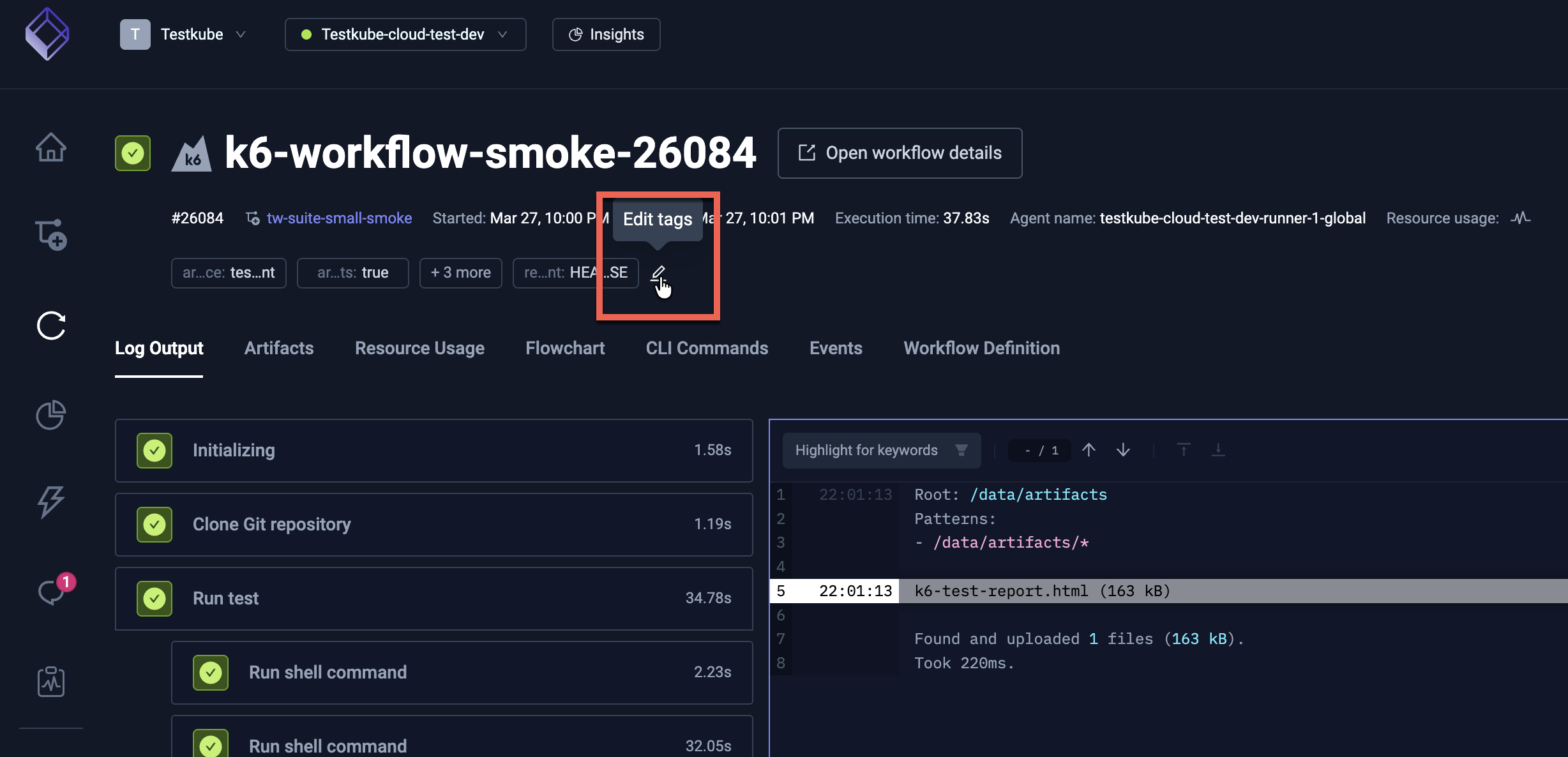
Open a completed execution in the Testkube Dashboard and edit its tags directly from the execution details panel.
From the CLI
Use the testkube update testworkflowexecution command to set or replace tags on a
finished execution:
testkube update testworkflowexecution <executionID> --tag release=v1.42.0 --tag status=reviewed
Via the REST API
The updateTestWorkflowExecution operation accepts a tags property to update tags on an
existing execution — Read More.
Via the MCP Server
When using Testkube's MCP Server, you can update execution tags
through the update_execution_tags tool, making it possible to tag executions from AI
assistants and automation pipelines.
Example Use Cases
Tagging Service and Target URL
This example shows how to tag executions with the service under test and target URL.
kind: TestWorkflow
apiVersion: testworkflows.testkube.io/v1
metadata:
  name: execution-tags-sample
  labels:
    docs: example
spec:
  config:
    serviceUnderTest:
      type: string
      default: local-service-under-test
    targetUrl:
      type: string
      default: https://testkube.io
  execution:
    tags:
      service: "{{config.serviceUnderTest}}"
      url: "{{config.targetUrl}}"
  steps:
    - name: Run curl
      container:
        image: curlimages/curl:8.7.1
      shell: curl -s -I {{ config.targetUrl }}
How It Works
-
The workflow defines two configuration variables:
serviceUnderTestandtargetUrl. -
These variables are used to set execution tags:
service: Set to the value ofserviceUnderTesturl: Set to the value oftargetUrl
-
Each execution of this workflow will be tagged with these values.
-
Importantly, you can change the config values on each run, allowing you to use the same workflow definition for testing different services and URLs.
Using Tags for Filtering
You can run this workflow multiple times with different values for serviceUnderTest and targetUrl. For example:
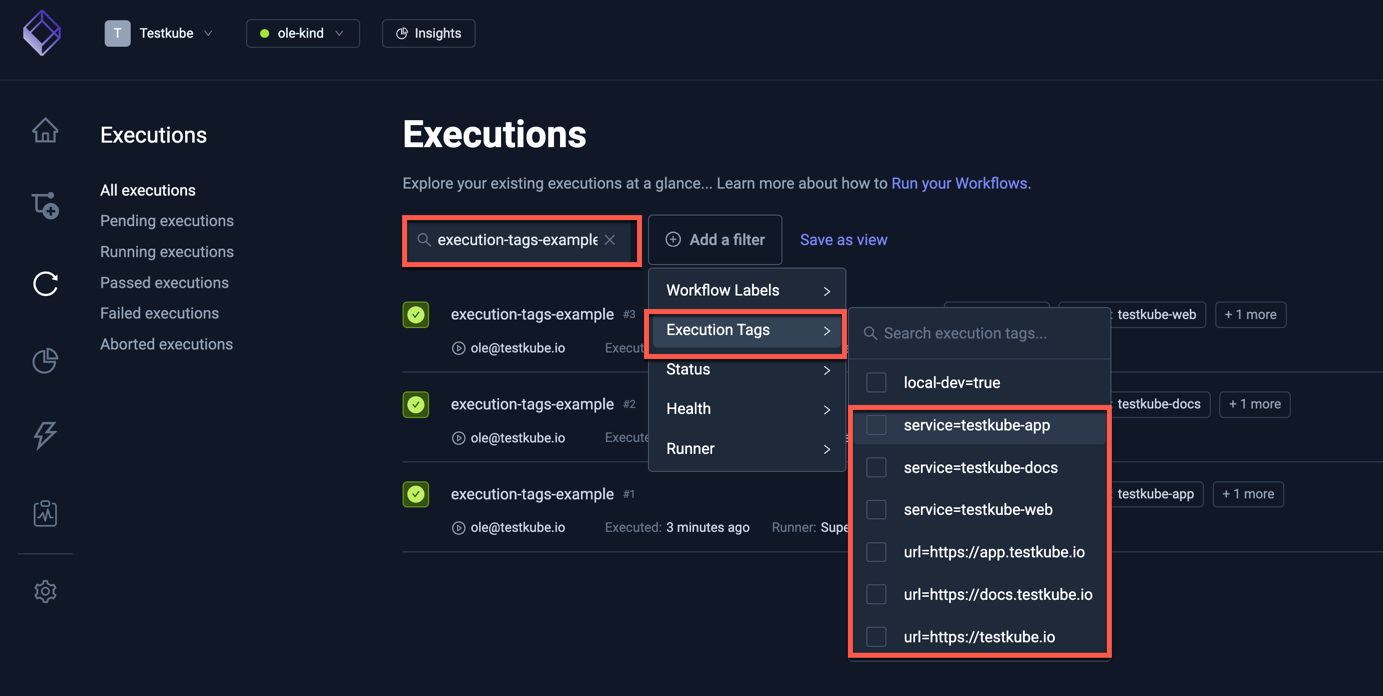
testkube-docsand its corresponding URLtestkube-appand its URLtestkube-weband its URL
These tags allow you to easily filter and view executions in the Testkube Dashboard Executions View based on the service or URL being tested.
Tracking Git Branches
This example demonstrates tagging executions with the Git branch being tested. This is particularly valuable when you're managing tests across multiple branches and need to track which tests were run on which branch.
Example Workflow
kind: TestWorkflow
apiVersion: testworkflows.testkube.io/v1
metadata:
  name: execution-tags-branches-sample
spec:
  config:
    branch:
      type: string
      default: main
  execution:
    tags:
      branch: "{{ config.branch }}"
  content:
    git:
      uri: https://github.com/kubeshop/testkube
      revision: "{{ config.branch }}"
  steps:
    - shell: echo running tests
How It Works
-
The workflow defines a configuration variable
branchwith a default value ofmain. -
This variable is used to set an execution tag:
branch: Set to the value ofconfig.branch
-
The same variable is used in the
content.git.revisionfield to specify which branch to check out. -
Each execution of this workflow will be tagged with the branch name.
-
You can change the
branchconfig value on each run, allowing you to easily test different branches.
Using Branch Tags for Filtering
You can run this workflow multiple times with different values for the branch. For example:
mainbranchfeature/new-testbranchbugfix/issue-123branch
These branch tags enable you to quickly filter and analyze test results for specific branches using the Executions View as shown above.
Post-Execution Failure Categorization
Tags don't have to be set at execution time. A powerful pattern is to tag executions after they complete — for example, an AI agent or CI pipeline step that inspects failed executions and categorizes the root cause.
Consider a scenario where an automated agent reviews every failed execution and adds tags describing the failure type:
testkube update testworkflowexecution 6723a8e5b4f3c21d009a1b2c \
  --tag failure-category=flaky-infrastructure \
  --tag root-cause=pod-eviction \
  --tag reviewed-by=ai-agent
Over time this builds a searchable catalog of failure modes. You can then filter the
Executions View by failure-category to answer questions like:
- How many failures this week were caused by flaky infrastructure vs. genuine test regressions?
- Which services have the most
timeoutfailures? - Have
pod-evictionfailures decreased after a cluster scaling change?
This works equally well from the Dashboard, the REST API, or the MCP Server — any tool that can call the update operation can participate in the tagging workflow.
Testkube includes a ready-made Failure Categorizer agent template that automatically
inspects failed executions and tags them by failure type (network, configuration,
infrastructure, or test_failure). See Agent Templates
for details.